
A blacklisted iPhone is one that carriers have blocked from connecting to mobile networks. It still turns on and runs apps over Wi-Fi, but it cannot make calls, send texts, or use mobile data. If you are buying a used iPhone, checking for this before you pay is the single most important step you can take.
The good news is that checking is quick and free, and you only need the phone’s IMEI number to do it. This guide shows you how to check, what the result means, and what your options are if an iPhone turns out to be blacklisted.
What does it mean when an iPhone is blacklisted?
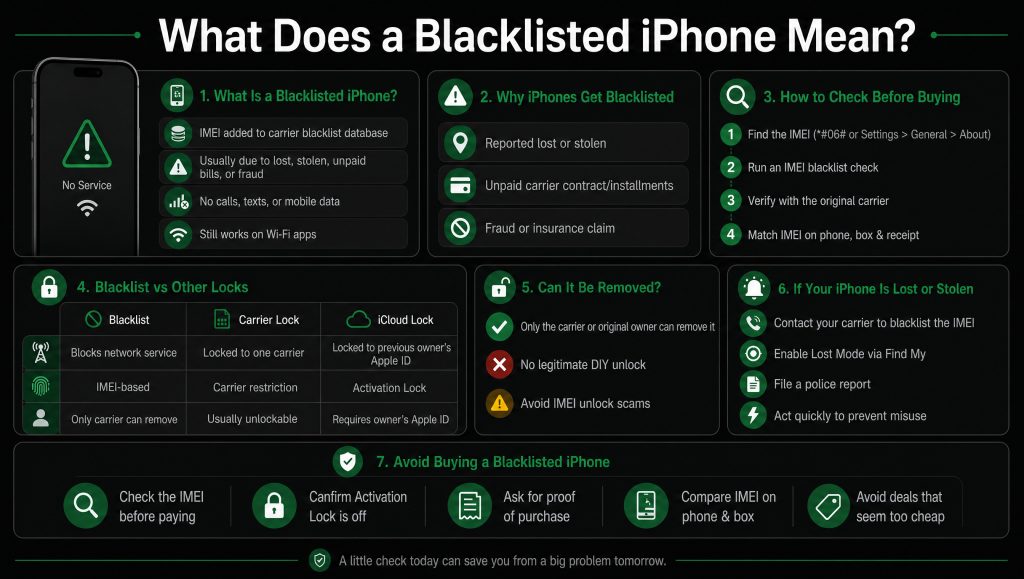
An iPhone is blacklisted when its IMEI number, the unique ID every phone has, gets added to a shared database that carriers use to block stolen, lost, or unpaid devices. Once it is on that list, networks refuse to connect it.
There are three common reasons an iPhone ends up blacklisted:
- It was reported lost or stolen by the original owner.
- It has unpaid bills or an unfinished installment plan tied to it.
- It was flagged for fraud or an insurance claim.
A blacklisted iPhone is not broken. Everything still works over Wi-Fi, so you can use apps, the camera, and the browser. What you lose is the part that makes it a phone: calls, texts, and mobile data on any carrier. That is why a blacklisted iPhone is worth so little, no matter how good it looks.
How to check if an iPhone is blacklisted?
Checking takes about two minutes and costs nothing. You find the iPhone’s IMEI number, run it through a checker, and ideally confirm with the carrier. Here is each step.
Find the IMEI or serial number
The IMEI is a 15-digit number that identifies the iPhone. There are a few easy ways to find it:
- Dial *#06# on the phone and it appears on screen straight away.
- Go to Settings, then General, then About, and scroll down to IMEI.
- Check the SIM tray or the original box, where it is often printed.
- Look on the purchase receipt if you have it.
If you are buying from someone, ask for the IMEI before you meet, not after. A seller who will not share it is a red flag.
Run an IMEI or serial blacklist check
Once you have the IMEI, enter it into a free blacklist checker like imei.info or imeicheck.com. In a minute or two, the result tells you whether the device is clean or blacklisted.
A clean result means no carrier has reported the phone as lost, stolen, or unpaid in the databases that checker covers. A blacklisted result means it has been flagged and will be blocked. Keep one thing in mind: free checkers do not cover every carrier in every country, so a clean result is a good sign but not a cast-iron guarantee. For an expensive iPhone, a paid report gives wider coverage and more history.
Check with the carrier
The most reliable check comes straight from the carrier. If you know which network the iPhone came from, you can ask them to look up the IMEI and confirm its status. In the UAE, that means contacting e& or du. This step matters because blacklists are country and carrier specific. An iPhone that shows clean in one country can still be blocked in another, so a local check is worth the few minutes it takes.
Blacklist, carrier lock, or iCloud lock?
People mix up three different problems, and they are not the same thing. Knowing which one you are dealing with changes what you can do about it.
- A carrier blacklist blocks the iPhone from networks because it was reported lost, stolen, or unpaid. It follows the IMEI.
- A carrier lock ties the iPhone to one network until it is unlocked. This is normal and usually easy to sort out.
- An iCloud lock, also called Activation Lock, ties the iPhone to the previous owner’s Apple ID through Find My. You cannot get past it without their password.
A factory reset clears none of these. So before you buy, check that the iPhone is not blacklisted and that Activation Lock is off. To confirm Activation Lock, make sure the phone reaches the setup screen and never asks for someone else’s Apple ID or password.
Can you remove or unlock a blacklisted iPhone?
Here is the honest answer: in most cases you cannot, and you should be careful of anyone who says otherwise. A blacklist can only be lifted by the carrier that placed it or the person who reported the phone. There is no legitimate way for a new owner to remove it on their own.
There are only a few real routes, and they all depend on the reason for the blacklist:
- If the carrier blacklisted it by mistake, they can remove it for free once they confirm the error.
- If it was blacklisted for unpaid bills, the original account holder has to clear the balance, then the carrier lifts it.
- If it was reported lost or stolen, only the person who reported it can reverse that, usually by getting the phone back to its rightful owner.
You will see websites offering “free blacklist removal tools” or IMEI-chip swaps. Avoid them. Most are scams that take your money or your details, and swapping an IMEI is illegal in many places and does not work on modern iPhones anyway. If an iPhone you own is blacklisted and none of the legitimate routes apply, your realistic options are to use it on Wi-Fi only or sell it for parts, with the status fully disclosed.
How to blacklist your own iPhone?
If your iPhone is lost or stolen, blacklisting it is the right move, and it is simple to do. Reporting it blocks the phone from networks so a thief cannot use it, and it protects you from any charges run up on your account.
Take these steps as soon as you can:
- Call your carrier, e& or du in the UAE, report the iPhone lost or stolen, and ask them to blacklist the IMEI.
- Open Find My on another device or at iCloud.com and put the iPhone into Lost Mode, which locks it and shows a message.
- File a police report. You will often need the IMEI number, so have it ready.
Reporting fast is what counts. The sooner the IMEI is on the list, the less use the phone is to anyone who took it.
How to avoid buying a blacklisted iPhone?
Avoiding a blacklisted iPhone comes down to a few simple habits. Most people who get caught out skipped the basic checks because a deal looked too good to turn down.
Run through this before you hand over any money:
- Get the IMEI and run a blacklist check yourself, in advance.
- Confirm the IMEI on the phone matches the box and the Settings screen.
- Make sure Activation Lock is off and the phone reaches setup without asking for another Apple ID.
- Ask for a proof of purchase or receipt.
- Be wary of any iPhone priced far below the going rate, sold for cash only, or from a seller who dodges questions.
This is also where buying from a proper store pays off. At ReMobile, every iPhone is IMEI-checked and confirmed clean before it is listed, so the blacklist risk is handled for you. When someone has already done the checking and stands behind the phone, you skip the guesswork entirely.
FAQ
Can a blacklisted iPhone still be used?
Yes, but only over Wi-Fi. You can use apps, the camera, and the browser, but you cannot make calls, send texts, or use mobile data on any carrier. That is why a blacklisted iPhone is worth very little.
Does a factory reset remove a blacklist?
No. The blacklist is tied to the IMEI in the carrier’s database, not to anything stored on the phone. Wiping the iPhone changes nothing about its blacklist status.
Is a blacklisted iPhone the same as an iCloud locked one?
No. A blacklist blocks the phone from mobile networks, while an iCloud lock stops you getting past the setup screen without the previous owner’s Apple ID. An iPhone can have one, both, or neither.
Can I check an iPhone by serial number instead of IMEI?
Yes. Many checker sites and carriers accept the serial number too, found in Settings under General then About. The IMEI is the more common way to check blacklist status, so use it if you have both.
Is it safe to buy a used iPhone at all?
Yes, as long as you check before you buy or use a seller that checks for you. A quick IMEI check removes almost all the risk. Most problems come from buying in a rush from an untrusted source.
Conclusion
Checking whether an iPhone is blacklisted takes two minutes and can save you hundreds, so never skip it on a used buy. Run the IMEI, confirm Activation Lock is off, and walk away from any deal that feels off. Explore our full refurbished iPhone range below.